Wholesale inventory management that tells you what's available, not just what you received.
You know roughly what's in the warehouse. You think you can fill the order. Then you find out a pallet was staged for another account three days ago and nobody updated the sheet. Simpentory tracks stock from receiving through staging so your counts reflect what's actually there, not what was there last Tuesday.
Warehouse inventory in Simpentory
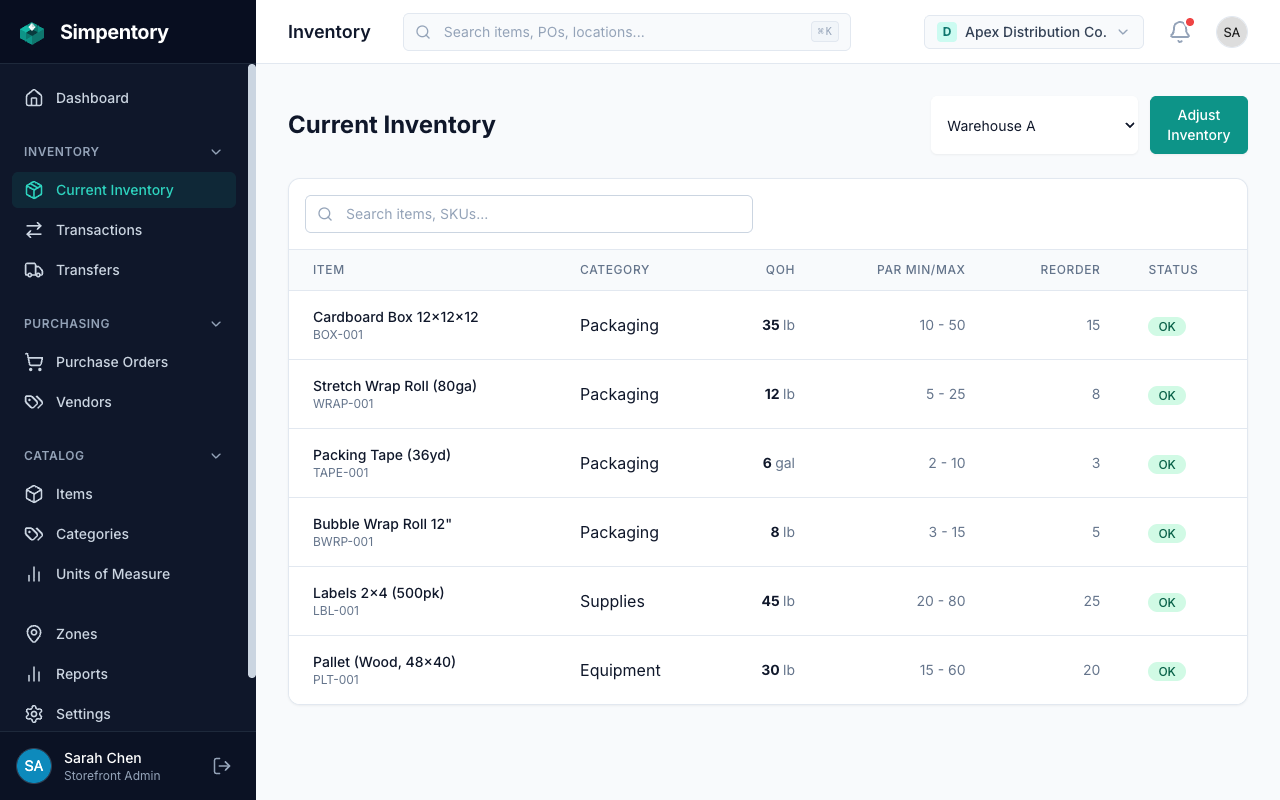
Available stock and committed stock tracked in separate zones. One number, no confusion.
The spreadsheet says you have it. The warehouse says you don't.
Take a coffee and paper goods distributor running 60 accounts. Orders go out five days a week. Stock moves constantly. A driver stages a case of espresso for Tuesday's route. Someone else counts the warehouse on Monday and writes down a number that includes that case. Wednesday's order gets promised based on Monday's count. Friday, the case isn't there.
The problem isn't careless people. The problem is that the inventory system doesn't distinguish between stock that's available and stock that's already committed to an account. The warehouse count and the staging count are the same number. Distribution inventory management software needs to separate those two things clearly, and most tools built for retail or e-commerce don't work that way.
Stock staged for a delivery route still shows in the warehouse count. Someone promises it to a second account. One of them doesn't get their order.
A supplier shipment comes in short. The driver signs for it and puts it away. Nobody records the discrepancy. The PO says 48 units arrived. 40 units are on the shelf.
End of month, something is off. Nobody can say when it happened, who moved it, or whether it was an honest count error or something else.
How Simpentory works for wholesale distribution
Three steps, no consultants required.
Set up your warehouse zones
Create a storefront for your warehouse operation. Then add zones for each physical area: Receiving Dock, Warehouse A, Warehouse B, Staging Area, Delivery Van. Name them whatever matches how your team already talks about the space.
Track stock from receiving through staging
Stock lands in the Receiving Dock zone. After it's counted and verified, move it to the warehouse zone. When it's pulled and staged for a delivery, move it to Staging. Every transfer writes a transaction record. The warehouse count always reflects what's in the warehouse, not what left yesterday.
Create and manage supplier purchase orders
Build a PO, add line items and expected quantities, and submit it to your supplier. When the shipment arrives, receive against the PO. Simpentory records exactly what came in versus what was ordered and adds only the accepted units to your inventory counts.
Your warehouse, mapped as zones
Every physical space where inventory lives becomes a zone. Stock moves between zones. Counts stay accurate because the system always knows where things are.
Receiving Dock
Incoming shipments land here first. Count the goods, verify against the purchase order, and receive only what you're accepting. Stock doesn't enter your warehouse counts until it moves out of Receiving.
Warehouse A
Primary storage for active inventory. This is the number your sales and operations team checks when deciding whether an order can be filled. Stock in here is available. Stock that moved to Staging is not.
Staging Area
Orders picked and ready for delivery. Moving stock into Staging removes it from the warehouse count the moment it's committed. No more counting staged pallets as available inventory by accident.
Delivery Fleet / Van
Stock loaded on a truck is still your inventory until it's delivered. Track what each vehicle is carrying as its own zone. When the driver completes a drop, adjust the van zone. You know what left the building and what came back.
Built for how distributors actually operate
No modules to configure. No enterprise pricing. The features a small wholesale distributor needs without the overhead of a system built for companies 20 times your size.
Purchase orders from your suppliers
Create POs with line items and expected quantities. Submit them to move to ordered status. Receive against them when the shipment arrives. Simpentory adds only the accepted units to your inventory and marks short deliveries as partially received. Every step is logged.
Full activity history
Every receipt, transfer, adjustment, and count is written to a permanent log with a timestamp and the team member who made the change. When something doesn't add up at end of month, you can trace exactly what happened and when. No more guessing.
Team access with roles
Add warehouse staff, drivers, and managers with the right level of access. Warehouse staff can count and adjust. Managers can create purchase orders and view full history. You control who can do what without building a custom permissions system.
Multiple warehouse storefronts
If you operate out of more than one facility, each warehouse runs as its own storefront, from $49/month. Your team can access one location or both depending on their role. Inventory doesn't bleed between storefronts. Each location's counts stay separate and accurate.
Common questions from wholesale distributors
If you don't see your question here, reach us at [email protected].
What does committed inventory mean for a wholesale distributor?
How do wholesale distributors track inventory across multiple warehouses?
How does Simpentory track committed inventory versus what's actually available?
How do purchase orders work when I'm receiving from a supplier?
Can Simpentory handle multiple warehouse locations?
How do I handle partial deliveries or damaged goods when receiving a shipment?
Looking for a different industry? See Food Service, Home Services, the Retail solution, or all solutions.
Stop running your distribution business off a count that's already wrong.
Set up your warehouse zones, load your items, and start tracking stock from receiving through delivery. Takes an hour to get started. from $49/month per storefront.
No credit card required to start. Cancel any time.