Restaurant inventory that matches how your kitchen is actually built.
The walk-in notebook. The order placed from memory because no one ran a count. Tuesday's number not matching Wednesday's delivery. Simpentory tracks restaurant inventory by zone so you know what you have before you order, and why counts drift when they do.
Current inventory in Simpentory
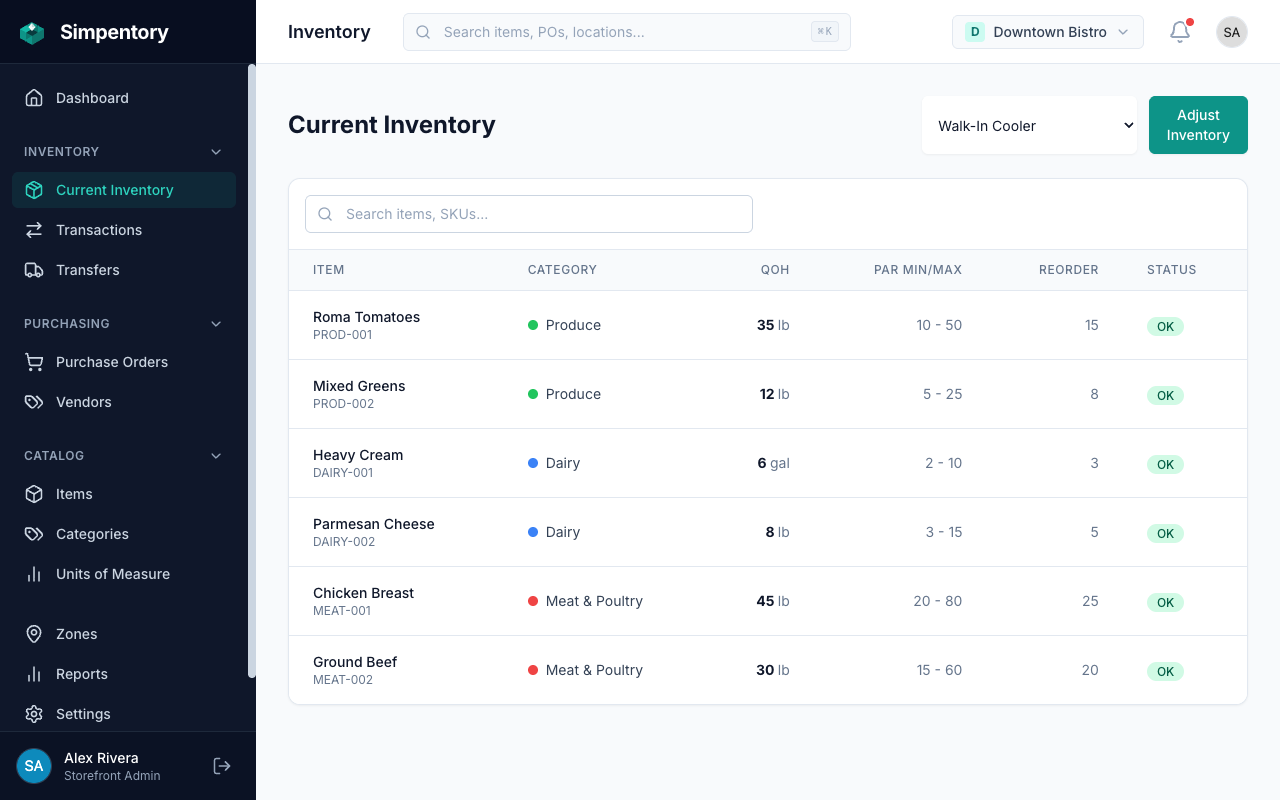
Zone-by-zone counts, PAR levels, and status at a glance. No spreadsheet required.
You already know the inventory problems. The spreadsheet just makes them worse.
Food cost variance shows up at the end of the month, after the damage is done. You over-ordered salmon last week because no one counted the walk-in before placing the order. You ran out of mise en place mid-service because prep didn't know the count was low. The gap between what your spreadsheet says and what's actually on the shelf is a number that costs real money, and most restaurants can only guess at what caused it.
The fix isn't another spreadsheet. It's knowing where things live in your kitchen and tracking them there. Walk-in separate from dry storage separate from the bar. Counts that update when a delivery comes in, not the next time someone remembers to open the file.
Someone orders from the distributor without checking stock first. The product arrives and now you have six cases of something you didn't need. The old stock gets pushed to the back. Some of it doesn't make it out.
A table orders the special. The kitchen starts the ticket and finds out there's nothing left. No one counted, no one flagged it, no one pulled the trigger on a reorder. The guest waits while the server walks back out.
Your food cost report says 32%. Your gut says it should be 28%. You go looking for where product went and find nothing. No waste log, no adjustment record, no count history. Just a number that's wrong and no way to fix it.
How restaurant teams use Simpentory in the kitchen.
Three steps. Matches the way a kitchen is actually laid out.
Set up your zones to match the kitchen.
Create a zone for each physical area: Walk-in Cooler, Dry Storage, Bar, Prep Area. Add more if you need them. Freezer, reach-in, expo, event storage. Every zone gets its own inventory list, its own count history, and its own transaction log. Counts from the walk-in don't mix with counts from dry storage.
Count, adjust, and record waste as it happens.
Run a count in the Walk-in Cooler before ordering. Record a waste entry in the Prep Area when product goes bad. Log an adjustment in Dry Storage when a bag gets damaged on receiving. Every entry writes to the activity log with a timestamp, a user, and the quantity. Nothing disappears.
Create purchase orders from your food vendors.
Build a PO inside Simpentory with the items and quantities you need. Submit it. When the delivery arrives, receive it line by line. The quantities post directly to the right zones. Your counts stay current without a manual entry step, and the PO history shows exactly what came in, when, and from which vendor.
One storefront, four zones. Each one tracked separately.
Zones let you organize inventory the way a kitchen is physically organized. Here's what that looks like for a typical full-service restaurant.
Walk-in Cooler
Your highest-value, highest-turnover storage. Counts here drive most of your ordering decisions.
- Proteins: beef, chicken, fish, pork
- Dairy: cream, butter, cheese, eggs
- Produce: lettuces, herbs, vegetables
- Beverages: juice, soda, beer kegs
Dry Storage
Slower-moving goods that still need a count before you order from the broadliner.
- Dry goods: flour, sugar, rice, pasta
- Canned: tomatoes, stock, beans
- Oils and vinegars
- Paper: to-go containers, napkins
Bar
Spirits, wine, and beer tracked separately from kitchen stock. Bar manager counts, bar manager orders.
- Spirits: vodka, whiskey, gin, rum
- Wine: house pours, bottles by the glass
- Beer: cans, bottles, draft by keg
- Garnishes: citrus, olives, cherries
Prep Area
Prepped product with a short shelf life. Knowing what's already done stops prep cooks from doubling up.
- Prepped proteins: portioned, marinated
- Sauces and stocks made in-house
- Mise en place: diced veg, aromatics
- Dough, batters, pastry components
Built for the way restaurants actually run inventory.
No POS integration required. No accountant needed to set it up. The features that matter most for food service operators, in one place.
Purchase orders from food vendors
Creates a PO, submits it, receives it. The full draft-to-received flow with auto-generated PO numbers. Receiving a delivery posts quantities directly to the right zones. No separate entry step.
Full activity history
Every count, every waste entry, every adjustment. Logged permanently with a timestamp and the team member who made it. Go back and see why your chicken count dropped on a Tuesday. The record is there.
Team access with roles
Give your bar manager access to the Bar zone. Give your sous chef access to the walk-in and prep area. Keep ordering and vendor management locked to managers. Everyone works in the areas that are theirs.
Multiple restaurant locations
Each restaurant is a storefront, from $49/month. Manage all of them from one account. Switch between locations, compare vendor histories, and keep each kitchen's inventory completely separate.
Common questions
What inventory does a restaurant typically track?
What is PAR level in a restaurant?
Can I track inventory across multiple restaurant locations?
How does Simpentory handle purchase orders from food distributors?
Can I log food waste so it shows up in my counts?
Does Simpentory integrate with my POS system?
Looking for a different industry? See Home Services, the Retail solution, the Wholesale solution, or all solutions.
Stop guessing what's in the walk-in. Start knowing.
Set up your zones, run a count, and place your first purchase order in the same day. No training required. No consultant needed.
Get started freeFrom $49/month per location. No contract.