Know what's on every service truck before you dispatch.
You dispatch Truck 1 to a job. The part the tech needs is not on the truck. It's at the shop. Or it's on Truck 2. The tech calls in. Now someone at the office has to figure out where it is. Then someone drives it over, or the tech makes a supply house run. That's two hours gone on a job that should have taken one.
Simpentory tracks service truck inventory by zone so you know exactly what's on each vehicle before the truck leaves the yard. HVAC inventory management software built for real field operations, not spreadsheets.
Truck inventory in Simpentory
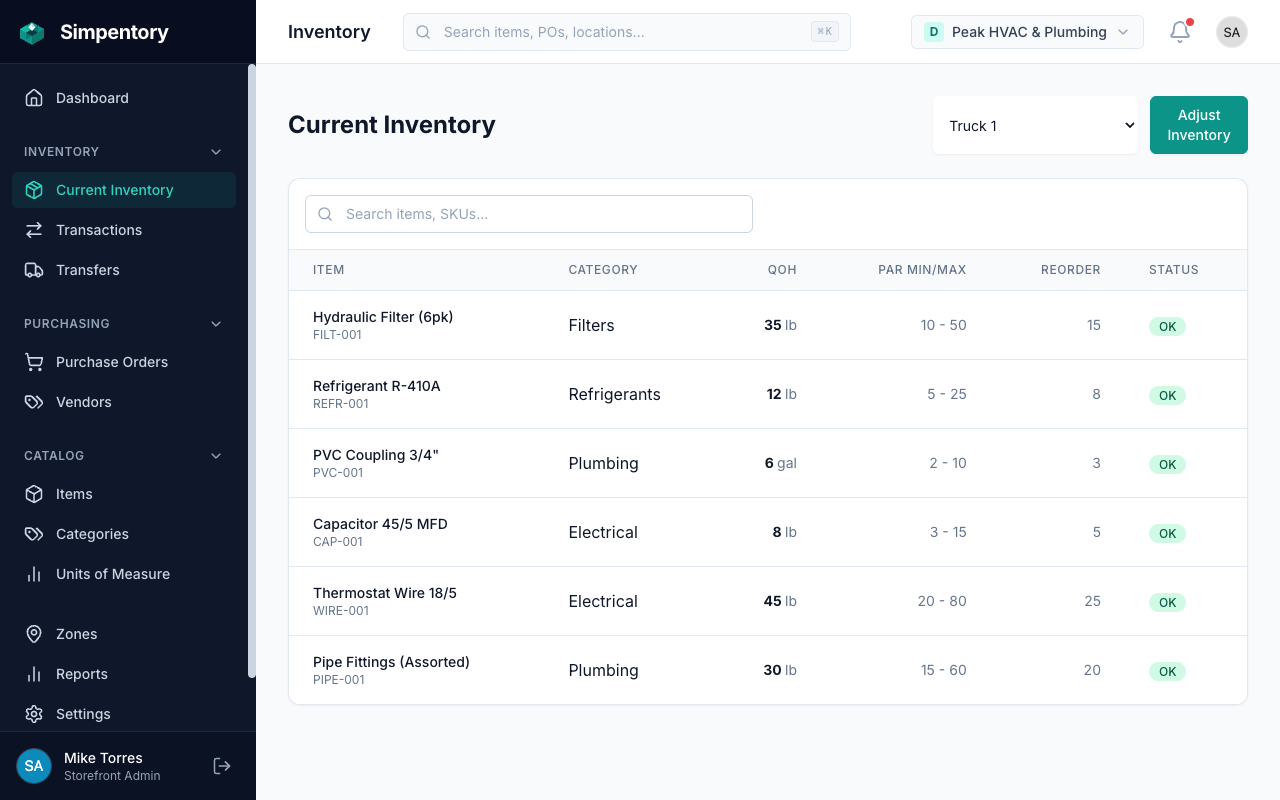
Each truck is a zone. Every part has a count. No more calling the shop to find out what's on board.
The parts problem that costs field crews every day.
HVAC, plumbing, and electrical operations run on parts. A tech who has the right part on the truck closes the job and moves on. A tech who doesn't has to stop, call, wait, or drive. That gap between "should be on the truck" and "actually on the truck" is where the money goes.
Most home services companies handle this with a combination of memory, whiteboards, and hoping the tech from yesterday restocked before they clocked out. It works until it doesn't. The supply closet at the shop becomes a mystery. Nobody knows how many 20x25 filters are left until someone counts, and nobody counts until they're out. The supply house run in the middle of a job doesn't get tracked anywhere, so the next time that item gets ordered, whoever orders it is guessing at the quantity.
The part that should be on Truck 2 but isn't.
The tech is sure it was stocked last week. Maybe it was used. Maybe it was moved. Nobody logged it either way, so now the tech is standing in a customer's mechanical room without what they need.
The shop supply room that nobody has fully counted.
You order when you notice you're low. You notice you're low when someone tells you. Someone tells you when they go to grab something and it's gone. That's a poor system for running a real operation.
The emergency supply house run that eats two hours of labor time.
The run itself takes an hour. The job gets rescheduled or delayed. The customer experience takes a hit. And none of it gets recorded anywhere, so it happens again next month.
How Simpentory works for home services companies.
Three steps. No complicated setup. You can have your trucks and shop set up in an afternoon.
Set up your trucks and shop as zones.
Truck 1, Truck 2, Van, Shop, Parts Room, Warehouse. Each one becomes a zone in your Simpentory storefront. The names are yours. The structure matches how your operation actually works.
Track parts and supplies on each zone.
Every item on every truck has a count. Techs log what they pull from their truck. The zone's inventory updates immediately. Before dispatch, you check the zone. You know what's there.
Restock from your suppliers with purchase orders.
When stock runs low, create a purchase order. Receive it against the PO when the order arrives. Simpentory records the receipt and updates the counts. Your supplier history is always current.
Your trucks, your shop, your zones.
A zone is any place inventory lives. Simpentory tracks each one independently. Here's how a typical home services company sets them up.
Truck 1
The primary tech's vehicle. Stocked with the items that move every week: filters, capacitors, contactors, refrigerant, common fittings. Before every dispatch, the tech checks their zone and confirms what's on board.
Truck 2
The second vehicle carries its own inventory, tracked separately. When Truck 2's tech pulls a part on a job, that zone's count drops. You always know whether it was Truck 1 or Truck 2, and what each one currently has.
Shop / Warehouse
Your main parts inventory. Bulk stock lives here before it goes to trucks. When a truck restocks, the transfer comes out of the shop zone. Receiving from suppliers adds to this zone. Everything is accounted for.
Parts Room / Cage
High-value parts that need tighter control. Compressors, ECM motors, expensive valves. The parts cage is a separate zone with its own count and its own activity log. You know exactly who pulled what and when.
Built for how home services operations actually work.
No fluff. The features a service company with multiple trucks actually needs.
Zone tracking by truck, before dispatch.
Before a truck leaves the yard, you check its zone. You see the current count for every item on that vehicle. If the capacitor count is zero, you know before the tech finds out in a customer's backyard. Simpentory shows what's there. Right now.
Purchase orders from your suppliers.
Create and send purchase orders to Johnstone, Ferguson, Winsupply, or any other supplier. Receive orders against the PO and Simpentory records the receipt and updates the correct zone's count. Your order history with every vendor stays current in one place.
Full activity history for every part movement.
Every inventory change creates a record. Who made it, when, and from which zone. When a compressor goes missing from the parts cage, you don't have to ask around. You look at the history. The answer is there.
Team access with roles for techs and managers.
Techs get access to update their own truck's zone. Managers see everything across all zones. No one needs to call the office to report what they used. They log it themselves, on the job, from their phone. Everyone has the right level of access and nothing more.
Questions about inventory management for field crews
How do field service companies track inventory on trucks?
What is the difference between warehouse inventory and truck inventory?
How do technicians in the field update their truck inventory?
What happens when a part gets used on a job?
Does it work if we do multiple service types, like HVAC and plumbing?
How do purchase orders work for reordering from suppliers?
Looking for a different industry? See Food Service, the Retail solution, the Wholesale solution, or all solutions.
Stop guessing what's on each truck.
Set up your trucks and shop as zones. Add your items. Your crew starts logging. That's it.
from $49/month per storefront. Everything included. No per-user fees.