Retail inventory management that tells you what you actually have.
You know this problem. End of season arrives and you find 40 units of something that never moved. Or you walk the floor, it looks thin, so you order. Then the back room turns out to have plenty. Retail inventory management software should prevent those moments. Simpentory tracks what's in back stock, what's on the floor, and what's in seasonal storage, so the surprises stop.
Back stock inventory in Simpentory
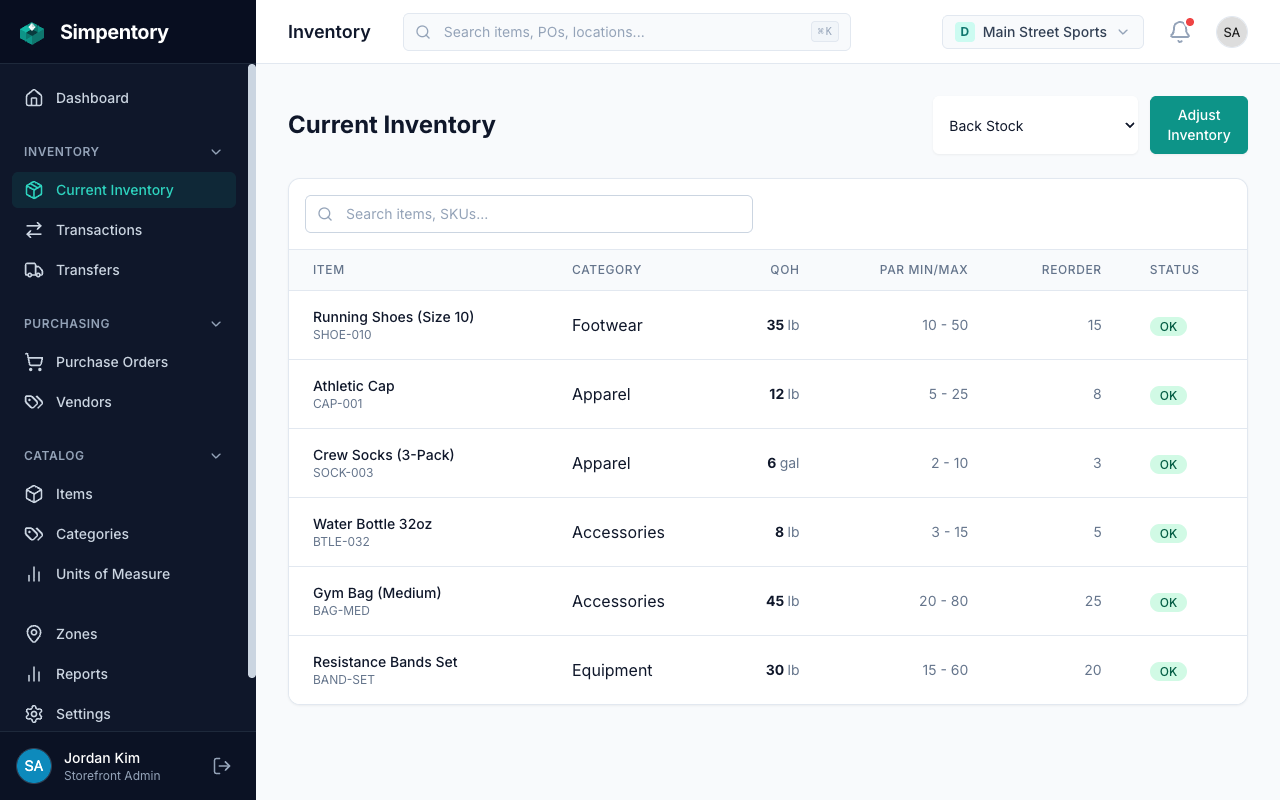
Back stock tracked separately from the sales floor. No more ordering product you already own.
The back room is where inventory goes to become a mystery.
Most small retail operations track inventory the same way: someone walks the floor with a clipboard or pulls a number from the POS. Neither one tells you what's actually in back stock. So you order based on what the floor looks like, not what you own. You end up with doubles. You end up with dead stock you didn't know was dead until the markdown.
The gap between "what the POS says sold" and "what you actually have on hand" is where retail losses hide. Items get received but never counted in. Stock gets moved but nobody records the move. Seasonal product sits in storage until someone does a full physical count, which maybe happens twice a year, maybe less. Simple inventory management software closes that gap. Not by automating everything, but by giving you a place to record what comes in, where it goes, and how much is left.
Inventory that isn't on the floor gets counted less. Boxes from two shipments ago. Sizes nobody asked for. You know it's there. You don't know how much.
Floor stock runs low, you reorder. The shipment arrives and you realize back stock had plenty. Now you own six weeks of a product you'll have to markdown to move.
End-of-season count uncovers product that was never tracked from receiving. You thought you sold through it. You didn't. Now you're discounting inventory you didn't know you had.
How retail inventory tracking works in Simpentory
Three steps from setup to full visibility. No consultant, no training session, no migration. You can be tracking real inventory counts the same day you sign up.
Set up your storefront and zones
Create a storefront for your store location. Then add zones for wherever inventory lives: back stock, sales floor, seasonal storage, display area. Name them whatever makes sense for your operation.
Track stock from receiving to the floor
When a shipment comes in, record it. When you move product from back stock to the sales floor, record the transfer. Every quantity change writes to the activity history. You always know where things are and what the count is.
Create purchase orders when you need to restock
When stock levels drop, create a purchase order from your vendor records. Submit it when you place the order. Mark it received when the shipment arrives. Simpentory logs the receipt and updates your zone counts automatically.
Zones match how your store is actually organized
A zone is any place where inventory lives. In retail, that usually means a few distinct areas with different purposes. Simpentory tracks them separately so you always know what's where.
Back Stock
Received inventory that hasn't made it to the floor yet. This is the zone most likely to have phantom stock: items you own but can't account for when the floor looks thin.
Sales Floor
Active selling inventory on the floor, shelves, or racks. Track what's available for purchase right now. Separate from back stock so you know the real floor count without a physical walk.
Seasonal Storage
Holiday product, off-season inventory, and clearance items waiting to be repriced or returned. Keeping this separate means you know exactly what's coming into the season and what's left at the end.
Display Area
Fixtures, signage, testers, demo units, and merchandise that's on display but not for immediate sale. Track what's out so you know what's been pulled, damaged, or needs restocking.
Inventory features built around how retail actually works
No bloat. The features here are the ones that address the actual problems: knowing what you have, tracking where it is, and ordering the right stuff at the right time.
Zone-based tracking
Simpentory tracks inventory by zone, not just by item. That means you can see back stock separate from floor stock at a glance. No physical count required to know if back stock is low. The numbers are updated every time you log a receipt, transfer, or adjustment.
Purchase orders from vendors
Create a purchase order, attach it to a vendor, submit it when you place the order, and receive it when the shipment arrives. Simpentory writes the received quantities to your zone counts. The whole flow goes from draft to received with a full record of what was ordered, from whom, and when it came in. Learn more about how purchase orders work.
Activity history
Every quantity change writes to a permanent activity log. Who made the change, what changed, and when. End-of-season discrepancies become traceable instead of just frustrating. If something doesn't match, the log shows you exactly where it went sideways.
Multi-storefront for multiple locations
Run more than one retail location? Each store is its own storefront in Simpentory, with its own zones and item counts. You manage everything from a single account. No need to log in and out or maintain separate spreadsheets per location. See pricing for multiple storefronts.
Common questions from retail store owners
What is the difference between back stock and floor stock in retail?
How do small retailers track inventory without a POS system?
Can I track inventory across multiple store locations?
How does it handle receiving a new shipment from a vendor?
Will I be able to see which items are sitting and not moving?
Does Simpentory connect to my POS system?
Looking for a different industry? See Food Service, Home Services, the Wholesale solution, or all solutions.
Stop finding surprises at end of season.
Set up your storefront, name your zones, and start tracking what you actually have. Back stock, floor inventory, seasonal storage. One place, one number per zone, no guessing. From $49/month per storefront, everything included.
Get Started · from $49/month per storefrontNo contract. Cancel any time. Two stores? $118/month. Three? $177.